

Adobe Acrobat Reader DC 26.002.21996
Adobe Acrobat Reader DC is the free, industry-standard PDF viewer from Adobe, offering viewing, printing, commenting, form-filling, e-signatures, and 2 GB of free cloud storage. The 2026 version adds AI-powered chat editing, PDF Spaces, and audio summaries. The free version covers the essentials, but editing requires Acrobat Pro at $14.99–$19.99/month. It's resource-heavy (900 MB–4.5 GB install) compared to alternatives like Sumatra PDF (under 10 MB) and Foxit Reader. Protected Mode becomes mandatory on Windows in December 2026, improving security but potentially breaking third-party plugins.
- Free
- Windows
- macOS
- Linux
- Android
- iOS
- Nov 11, 2026
Screenshots
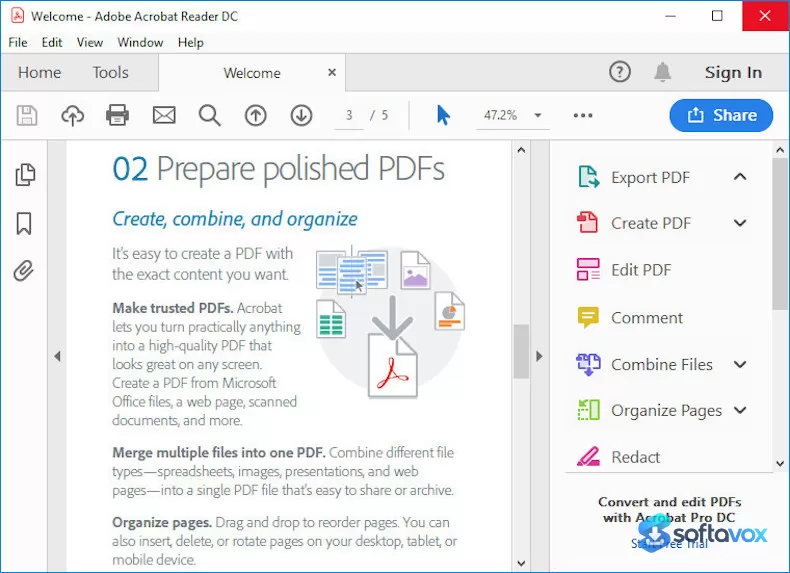
About Adobe Acrobat Reader DC
Adobe Acrobat Reader Download, Free PDF Viewer and Editor
TL;DR Quick Take / Who is this for?
Adobe Acrobat Reader is the free, industry-standard application for opening, viewing, and interacting with PDF files, and it remains the most feature-complete free PDF viewer available in 2026[reference:0]. The free version covers the essentials, viewing, printing, commenting, form filling, and basic signing, and the 2026 release adds AI-powered tools like an Assistant that can summarise documents and answer questions about their content. The software is available for Windows, macOS, Android, iOS, and the web, and it integrates with cloud services like Google Drive, OneDrive, and Box[reference:2]. The trade-offs are significant and well documented. The free tier is deliberately limited: editing text and images, converting PDFs to other formats, and compressing files require a paid subscription, and the software is frequently criticised for high resource consumption and occasional security vulnerabilities[reference:3]. Trustpilot ratings for Adobe sit at 1.1 out of 5, driven by billing and subscription complaints, while professional review sites rate the product itself much higher[reference:4]. Adobe Acrobat Reader is the right pick for anyone who needs a reliable, universally compatible PDF viewer with strong annotation and signing tools. It is not the best choice for users who need full PDF editing without paying, or for those who want a lightweight, ad-free reader with no upsell pressure.
Quick Info Box
| License Type | Freeware (paid subscriptions from ~$1.95/month for additional features) |
|---|---|
| File Size | Approx. 729–751 MB (Windows installer); ~380 MB (macOS) |
| OS Compatibility | Windows 11/10, macOS 12+, Android, iOS, Web |
| Latest Version | 2026.002.21900 (September 2026) |
| Developer | Adobe Inc. |
Key Features & Real-World Usability
Adobe Acrobat Reader’s core strength is its breadth of compatibility and the depth of its free toolset. It opens any standard PDF and renders it faithfully, regardless of the device or operating system used to create it[reference:5]. The free version includes full annotation tools, highlighting, sticky notes, freehand drawing, and text comments, making it genuinely useful for reviewing documents collaboratively. Form filling works with both Acroforms and XFA forms, and the software supports handwritten and digital signatures, which is essential for contracts and official documents[reference:6]. The 2026 release brings AI capabilities that are genuinely useful rather than gimmicky. The AI Assistant can summarise long documents, answer specific questions about their content, and even help edit or reorganise pages using natural language prompts. Adobe has also integrated PDF workflows with ChatGPT, allowing users to work on PDFs directly through natural language commands. Cloud integration is another pillar: the Reader connects to Google Drive, OneDrive, Box, and Adobe’s own cloud storage, so you can access and share files across devices without downloading them locally[reference:9]. The limitations are the price of the free model. Editing text and images, converting PDFs to Word or Excel, compressing files, and combining or splitting documents all require a paid subscription. The software is also heavy: the Windows installer is over 700 MB, and the application consumes significant system resources, which is a recurring criticism in independent reviews[reference:10]. Security vulnerabilities have appeared periodically, and users must keep the software updated to avoid known exploits.
- Universal PDF viewing: Renders any standard PDF faithfully across Windows, macOS, Android, iOS, and web, maintaining the exact layout regardless of the device used to create it.
- Full annotation and commenting: Highlight text, add sticky notes, draw freehand, and insert comments, making the free version genuinely useful for document review and collaboration.
- Form filling and signing: Supports both Acroforms and XFA forms, with handwritten and digital signature capabilities for contracts and official documents.
- AI Assistant (2026): Summarise long documents, ask questions about their content, and edit or reorganise pages using natural language prompts.
- Cloud integration: Connect to Google Drive, OneDrive, Box, and Adobe cloud storage to access, share, and collaborate on files across devices.
- Browser integration: Automatically integrates with web browsers to open PDFs without downloading them first, streamlining online document workflows.
- Text search and accessibility: Full-text search within long documents, plus accessibility features for screen readers and keyboard navigation.
Pros, Cons & Community/User Feedback
User sentiment around Adobe Acrobat Reader is sharply divided between professional review platforms and consumer complaint sites, and the split reflects the difference between the product’s capabilities and Adobe’s business practices. On professional review sites, the Reader performs well: G2 shows a 4.5 out of 5 from over 1,750 reviews, Capterra records a 4.6 from more than 10,500 reviews, and GetApp shows a 4.7 from the same review base[reference:11]. Reviewers consistently praise the intuitive interface, the reliability of the viewing experience, and the strength of the annotation and signing tools. One Capterra reviewer describes it as “one of the best programs I use,” highlighting the clear tabbed navigation and ease of use. Software Advice’s analysis of over 10,500 verified reviews concludes that the software is praised for its “intuitive design, quick access to essential functions, and the ability to work efficiently across devices”[reference:13]. The complaints are equally consistent and fall into two categories. First, the free/paid split: reviewers repeatedly note that the tools they need are locked behind a subscription, with one Capterra reviewer stating bluntly that “the only downside to it is its premium pricing”. Second, performance and stability: CHIP’s review highlights “too high resource consumption” and “recurring security vulnerabilities” as the software’s main drawbacks, and the installer size of over 700 MB is unusually large for a PDF reader[reference:15]. Trustpilot tells a much darker story, with a 1.1 out of 5 rating from over 6,750 reviews, driven by complaints about billing, cancellation difficulties, and subscription traps[reference:16]. The practical takeaway is that the software itself is capable and well-regarded by professional reviewers, while Adobe’s subscription practices and the software’s resource footprint are the areas where user frustration is most acute.
Pros
- Industry-standard PDF compatibility and faithful rendering across all platforms
- Free version includes full annotation, commenting, form filling, and signing
- AI Assistant for document summarisation and natural-language PDF editing (2026)
- Cloud integration with Google Drive, OneDrive, Box, and Adobe cloud
- Strong accessibility features and full-text search
- 4.5–4.7 average ratings across G2, Capterra, and GetApp
- Available on Windows, macOS, Android, iOS, and web
Cons
- Editing, conversion, and compression require a paid subscription
- Large installer (over 700 MB) and high resource consumption
- Periodic security vulnerabilities require regular updates
- Trustpilot rating of 1.1/5, driven by billing and cancellation complaints
- Frequent upsell prompts for paid features
- Free version cannot edit text or images in PDFs
- Subscription pricing is widely criticised as expensive for casual users
Final Verdict & Safe Download Advice
Adobe Acrobat Reader remains the safest default for anyone who needs to open, read, annotate, and sign PDFs, and the 2026 release adds AI tools that genuinely improve the experience of working with long documents. The free version covers the essentials, the compatibility is unmatched, and the annotation and signing tools are reliable enough for professional use. If you need a PDF viewer and you are not prepared to pay for editing features, the Reader will serve you well, and the AI Assistant is a useful bonus for summarisation and document Q&A. The caveats are real. The software is heavy, the free tier is deliberately limited to push you toward a subscription, and Adobe’s billing practices have generated a level of consumer anger that is rare even in the subscription software market. If you need full PDF editing and you want to avoid a subscription, Foxit PDF Editor or a one-time-purchase alternative may be a better fit. If you only need a viewer and you are on a low-spec machine, a lighter alternative like SumatraPDF or a browser-based viewer will use fewer resources. For everyone else, Adobe Acrobat Reader is the industry standard for good reason, and the free version delivers what most users need.
- Download only from get.adobe.com/reader or the official Adobe site: The Turkish download page in this review is the legitimate source, and Adobe’s official site distributes the installer directly. Third-party “Adobe Reader download” sites frequently bundle adware or repackage the installer with unwanted software.
- Verify the installer size and version: The Windows installer is approximately 729–751 MB, and the current version is 2026.002.21900. A dramatically smaller file or an older version number is a warning sign.
- Check system requirements before installing: The 64-bit Windows version requires Windows 11 or Windows 10 (64-bit, version 1809 or later), an Intel or AMD 1.5 GHz processor, 2 GB of RAM, and 900 MB–1 GB of free disk space. macOS requires macOS 12 or later and 380 MB of disk space.
- Decline optional offers during installation: The installer may offer additional Adobe products or services, such as a Chrome extension or cloud storage trial. Deselect anything you did not intend to install if you only want the Reader.
- Be aware of the subscription upsell: The free Reader will prompt you to subscribe to Acrobat Pro when you attempt to use editing or conversion features. If you do not need those features, ignore the prompts and continue using the free viewer.
- Keep the software updated: Adobe regularly releases security patches for the Reader. Enable automatic updates or check for updates manually to avoid known vulnerabilities that have been exploited in the wild.
Similar software



Key features
- Free, industry-standard PDF viewer, opens and renders any standard PDF faithfully across Windows, macOS, Android, iOS, and web
- Full annotation and commenting, highlight, sticky notes, freehand drawing, and text comments in the free version
- Form filling and signing, supports Acroforms and XFA forms, plus handwritten and digital signatures
- AI Assistant (2026), summarise long documents, ask questions about content, and edit/reorganise pages with natural-language prompts
- Cloud integration, connects to Google Drive, OneDrive, Box, and Adobe cloud storage
- Browser integration, opens PDFs directly in web browsers without downloading first
- Text search and accessibility, full-text search plus screen-reader and keyboard-navigation support
Frequently asked questions about Adobe Acrobat Reader DC
Is Adobe Acrobat Reader DC safe to download?
Is Adobe Acrobat Reader DC free?
What is Adobe Acrobat Reader DC used for?
Which systems does Adobe Acrobat Reader DC run on?
Why is Adobe Acrobat Reader DC so large?
How do I uninstall Adobe Acrobat Reader DC?
Versions
| Version | Release date | Platform | File size | |
|---|---|---|---|---|
| Adobe Acrobat Reader DC 26.002.21996 Latest version | Oct 5, 2026 | Windows | 1.6 MB | Download |
Comments about Adobe Acrobat Reader DC (1)